
New Mail Assure Releases: Turning Email Security Signals into Faster Business Decisions

By Ovidiu Cobzaru
Two new N-able Mail Assure releases turn raw email security signals into decisions a business can act on. Dashboard enhancements show which users are targeted most, and homograph attack header detection catches lookalike impersonation in message headers. The outcome is less time interpreting alerts and more time acting on the risk that matters.
Email is still one of the most familiar paths to phishing, impersonation, credential theft, and account misuse. Published industry research points in a consistent direction: phishing and credential-focused attacks remain among the leading entry points; AI-assisted campaigns are harder to spot by eye, and breach costs remain high. Protection alone no longer answers the question a business owner asks, which is “how exposed are we right now?” and “what should we do next?”
The latest Mail Assure releases are built for that question. They help teams see where email risk is concentrated and detect lookalike characters in message headers that make an unfamiliar sender read as a trusted one. For MSPs, that means sharper client conversations and reporting that justifies the service. For internal IT teams, it means clearer operational awareness and a better story to tell the business.
What do the Mail Assure dashboard enhancements change for email security reporting?
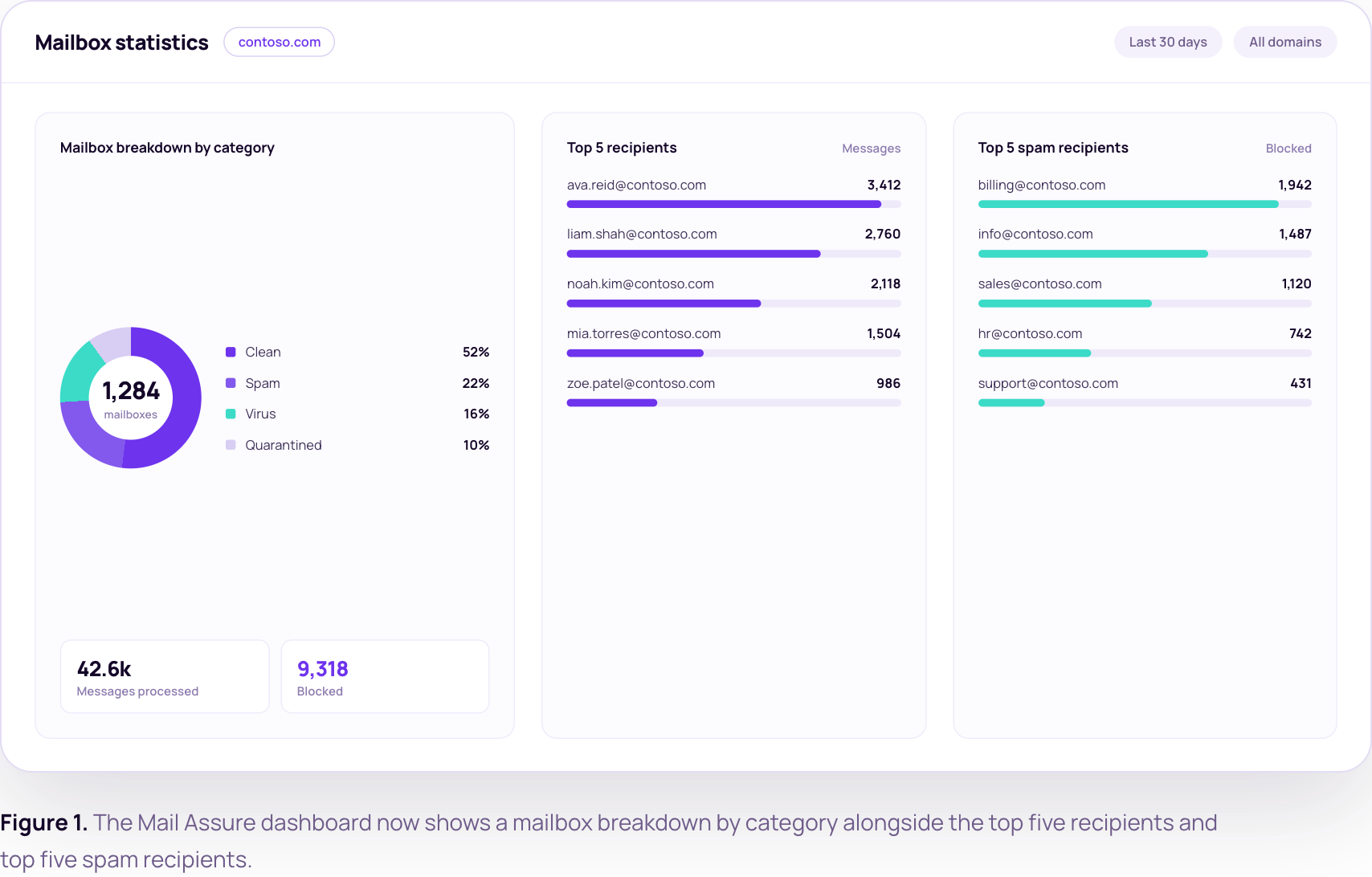
Security reporting fails when it is too technical for business stakeholders or too generic for the people who must act. The Mail Assure dashboard and PDF report now include a mailbox breakdown by category, the top five recipients, and the top five spam recipients. Stats are now captured for every recipient, not only those with protection reports enabled.
That turns a static report into a prioritization tool. Teams can now do three things straight from the report:
- Show a client exactly who is targeted most, turning a monthly report into a risk conversation that supports renewal.
- Point security awareness training at the users who attract the most spam, instead of the whole company.
- Spot the mailboxes that need a policy review before they become an incident.
The business outcome is straightforward: clearer reporting, better prioritization, and email risk conversations the business can follow.
How does homograph attack header detection stop lookalike impersonation?
A homograph attack, also called a homoglyph attack, swaps a character in a name for a lookalike character from another script, so a fake sender or brand reads as the real one. Impersonation works when an email looks familiar enough to earn trust. Attackers swap in lookalike characters, so a sender or brand reads as legitimate immediately. The recipient rarely catches it, and the team defending the organization cannot write and maintain a custom rule for every variation.
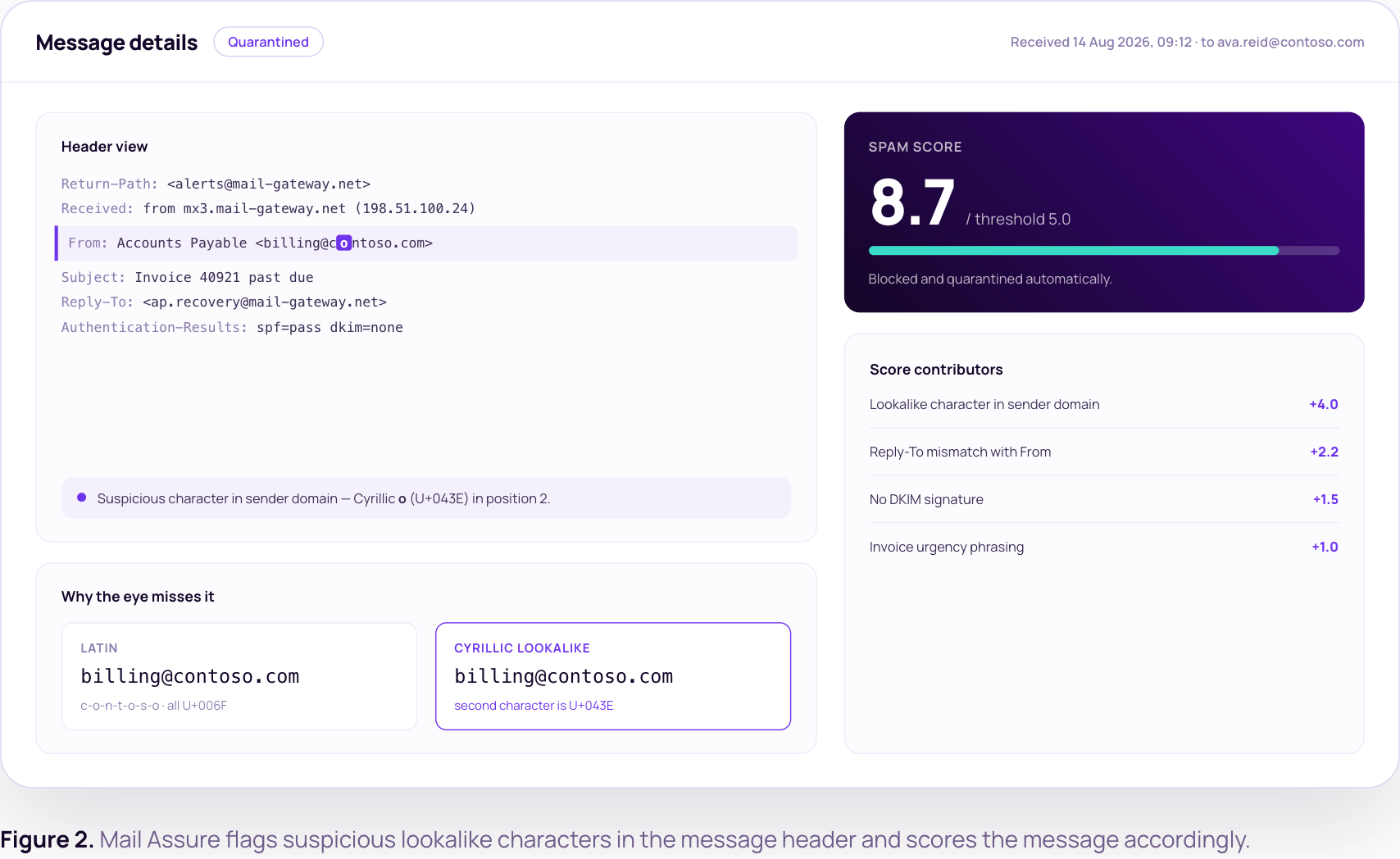
Mail Assure now identifies suspicious lookalike characters in message headers and scores those messages accordingly. That improves detection of brand impersonation without asking teams to build and maintain custom rules.
The value is fewer hours spent on tuning rules, faster classification of suspicious mail, and a lower chance that one believable email becomes a credential theft incident. For an MSP, that is protection that scales across client tenants without adding rule-maintenance work for each one.
Why do these email security releases matter now?
Both updates share one theme: moving email security from message filtering to decision support. Teams get a broader view of risk signals, user impact, and reporting value.
Most buyers do not want more alerts. They want better answers: where risk is concentrated, what action comes next, and how to explain the value of email security to people who do not work in security. These releases give Mail Assure a bridge between technical signal and business decision.
What is in it for MSPs and IT teams?
For MSPs, these releases support service differentiation, reporting worth charging for, and proactive client conversations that protect renewals. For internal IT teams, they support clearer visibility, faster investigation, and tighter alignment between security work and business outcomes. Both audiences get the same thing: less time interpreting disconnected signals, and more confidence in what to do next.
The bottom line: Mail Assure is adding practical visibility exactly where teams need it, in reporting and impersonation detection. That turns email security from a background control into a source of insight, action, and trust.
Frequently asked questions
Do the new dashboard stats require any configuration?
No. Stats are now captured for every recipient, not only those with protection reports enabled, so the mailbox breakdown, top five recipients, and top five spam recipients appear without extra setup. Teams get the fuller picture in both the dashboard and the PDF report from the next reporting cycle.
Does homograph detection replace our existing impersonation rules?
It reduces how many you need to write. Mail Assure scores messages containing suspicious lookalike header characters automatically, so teams stop maintaining a custom rule per variation. Existing rules keep working, but the ongoing tuning effort drops, which matters most for MSPs managing many client tenants.
How do these releases help justify email security spend?
They translate email activity into business language. Reporting shows where risk concentrates by user, and impersonation detection shows what was stopped. That is the evidence a business stakeholder needs to see value, and the evidence an MSP needs to defend a renewal.
Ready to put these Mail Assure releases to work?
Start a free trial of Mail Assure and see the new dashboard stats and homograph detection against your own mail flow.
© N‑able Solutions ULC e N‑able Technologies Ltd. Todos os direitos reservados.
Este documento é fornecido apenas para fins informativos e não deve servir de base para aconselhamento jurídico. A N‑able não oferece nenhuma garantia, expressa ou implícita, nem assume qualquer responsabilidade legal ou responsabilidade pela precisão, integralidade ou utilidade de qualquer informação nele contido.
As marcas N-ABLE, N-CENTRAL e outras marcas registradas e logotipos N‑able são de propriedade exclusiva da N‑able Solutions ULC e da N‑able Technologies Ltd e podem ser marcas legais comuns, registradas ou de registro pendente com o Escritório de Marcas e Patentes dos EUA e com outros países. Todas as outras marcas comerciais mencionadas neste documento são usadas apenas para fins de identificação e são marcas comerciais (e poderão ser marcas registradas) de suas respectivas empresas.