We are pleased to announce new enhancements to the Incoming - Blocking Filtering Rules module, including the possibility to easily configure a rule preventing spear phishing – CEO Fraud.
This filtering rule allows you to enhance protection for high-value email addresses such as CEOs, CFOs, finance teams, etc. which are typical targets for social engineering attacks using a spoofed display name.
Over the next two weeks, we will be enabling the following options to enhance your experience in configuring rules to prevent spear phishing attacks:
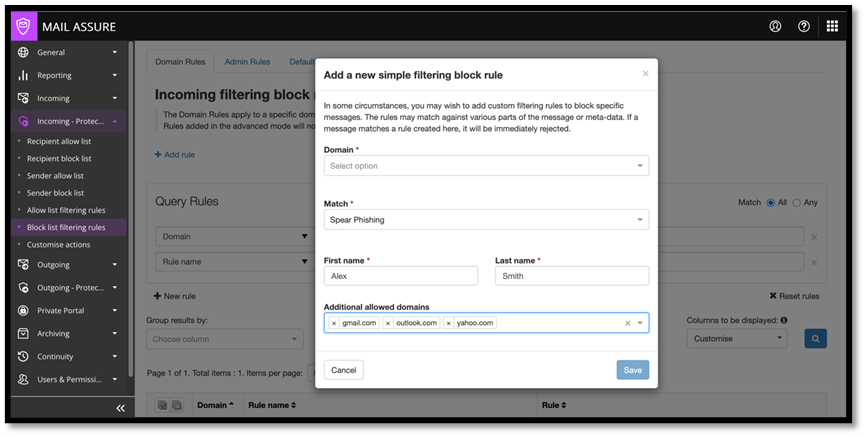
For Incoming - Protection Settings , the Block list filtering rules module has been enhanced with “Spear phishing” criteria, offering the possibility to easily configure a blocking rule for the attackers posing as the CEOs, VPs or high-ranking executives.

For both Simple and Advanced Block list Filtering Rule modes, the “Spear phishing” match criteria only requires First Name and Last Name to define the rule blocking the messages that impersonate high-ranking roles in a company.
The rule configuration has been designed to offer the flexibility for the domains maintained to be excepted from this blocking rule (using Simple Block list Filtering Rule mode).
The messages, coming from the email addresses configured in such a rule, from the domains which are not maintained as excepted, will be quarantined with a specific Sub class value.

We recommend configuring the rule to prevent spear phishing - CEO Fraud for the email addresses of the high-ranking executives/roles.
We’ve also implemented the following improvements: