We are pleased to announce enhancements to our reporting options by adding an easier way to configure the Automatic Email Scout Report as well as the option to temporarily disable the Email Scout Report.
In the next two weeks, we will introduce new options to improve the reports configuration experience. Additionally, the legacy Automatic Email Scout Report option from the Domain Settings page will be deprecated.
We have introduced a simpler method for configuring the Automatic Email Scout Report. A new option is now available on the Incoming, Automatic Email Scout Reports tab-page, specifically for filtered domains that do not already have such a report configured.

A one-click option configures the report to be sent 3 times per day according to the scheduled time: “08:00+ / 12:00+ / 16:00+“.
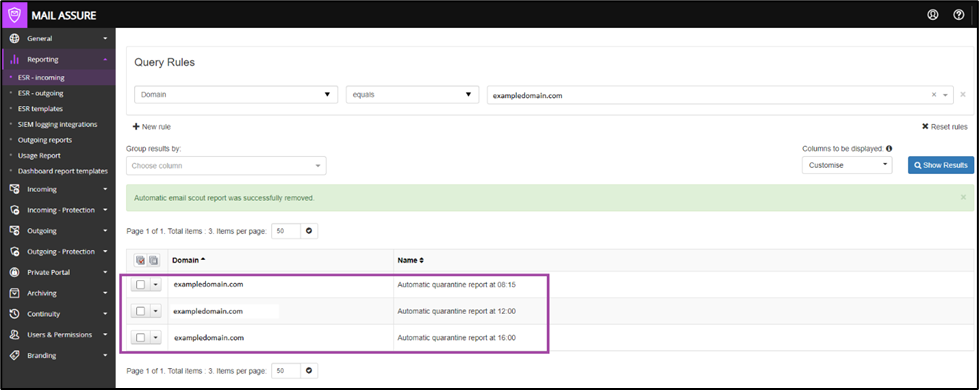
We have introduced the option to temporarily disable already configured Email Scout Reports without needing to remove them. This feature enhances report handling by preserving the report configuration, allowing for easy re-enablement when needed.
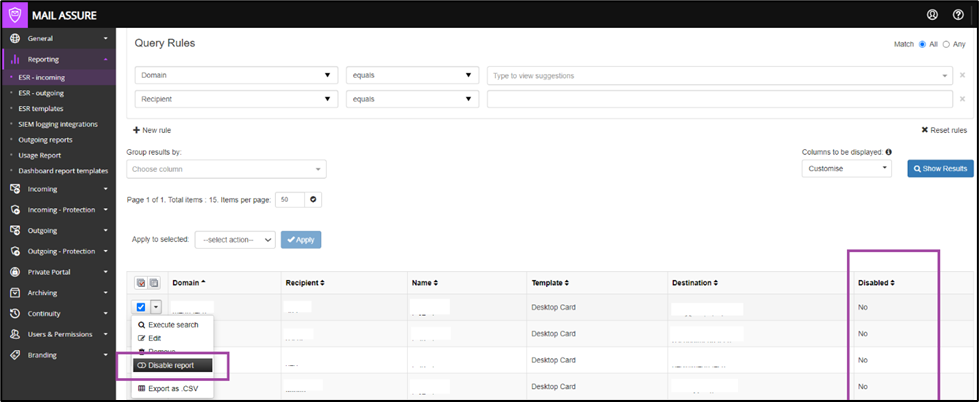
The new option is available for both Incoming and Outgoing Email Scout Reports and it applies for single and multiple reports selection.
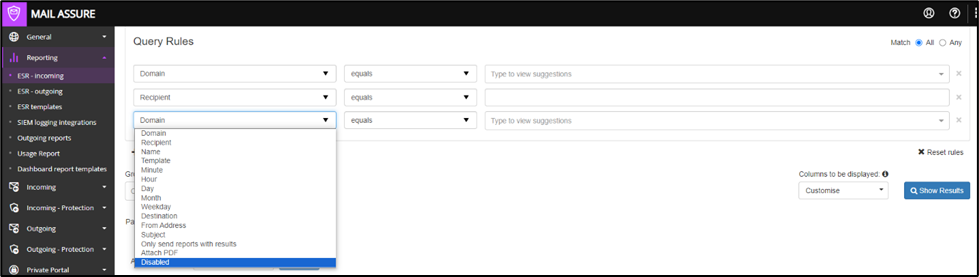
A new “Disabled/Enabled” column is available to display the report status and serves as new criterion in the filtering rules.
The legacy option “Automatically Enable Daily Email Scout Reports” on the Domain Settings page will be removed.

The reports already configured with this option are not going to be affected and they can be edited, as usual, on the Incoming, Automatic Email Scout Reports tab-page.
Instead, we are offering two ways to easily configure the reports:
Since the latest major release, we’ve fixed the following issues:
