


Azure Backup Back up Microsoft Azure workloads without limiting recovery
Cove Data Protection helps keep Azure workloads protected and recoverable with cloud-native backup, immutable copies, and automated recovery testing. No backup hardware required.
Reduce risk and simplify operations for Azure workloads
Avoid the risk of “all eggs in one basket”
If Azure becomes unavailable, you can still recover to virtually any platform, including Hyper-V, VMware, bare metal, and even back into Azure.


Operational simplicity
Unified backup and recovery across Azure, on-premises, and private cloud environments reduces complexity and risk for IT teams.
Keep Azure egress costs low with TrueDelta
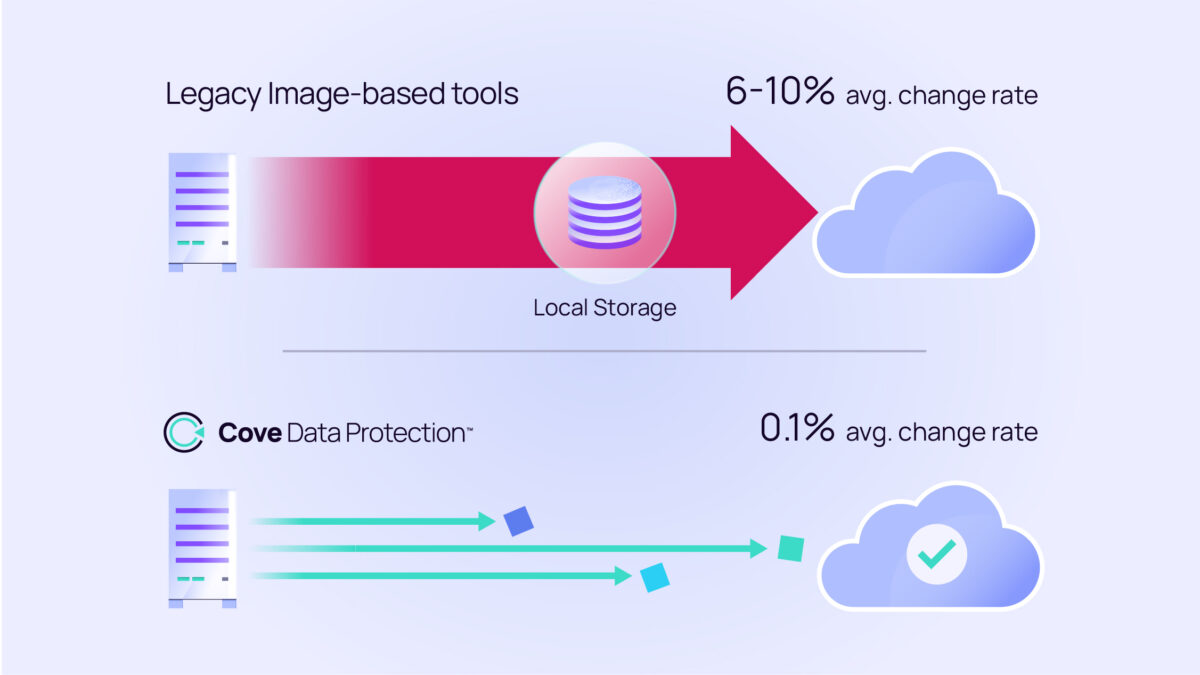
Moving data out of Azure can be a safe but costly process. Cove’s TrueDelta technology transfers up to 60x less data than image-based solutions, helping keep transfer sizes small and egress fees low.

Immutable, isolated backups by default
Every backup stored in the N-able cloud is immutable and architecturally separated from your network. Ransomware can’t reach what it can’t touch, helping keep recovery data protected when an attack occurs.
Simplify disaster recovery without the infrastructure burden
Keep your business running when the unexpected happens. Cove Disaster Recovery as a Service (DRaaS) delivers near-instant failover and automated recovery testing to help ensure rapid, reliable recovery with confidence.
FAQs
What is Cove Data Protection, and how does it support Azure backup?
What is Cove Data Protection, and how does it support Azure backup?
Cove Data Protection is a cloud-native backup and disaster recovery platform from N-able that protects servers, workstations, and Microsoft 365 data. For Microsoft Azure environments, Cove supports Standby Image and One-Time Restore directly in Azure, enabling near-instant failover and on-demand recovery VM deployment from any restore point in your backup history. It’s designed for MSPs and internal IT teams that need reliable Azure backup solutions without managing complex DR infrastructure.
How does Cove back up workloads to Microsoft Azure?
How does Cove back up workloads to Microsoft Azure?
Cove can proactively maintain a continuously updated bootable VM image in a Microsoft Azure environment you own or manage. This Standby Image capability means that when a server fails or an incident occurs, the protected workload can fail over within minutes without waiting for a full restore. One-Time Restore can also reactively boot a recovery VM in Azure from any available restore point on demand.
Does Cove replace native Azure Backup?
Does Cove replace native Azure Backup?
Cove is a comprehensive backup and disaster recovery platform that goes beyond what native Azure tools cover on their own. Where native Azure Backup focuses on cloud-hosted workloads, Cove protects servers, workstations, and Microsoft 365 data from a single, unified platform. It also adds immutable Fortified Copies, delivers automated recovery testing with AI-powered verification, and supports recovery to Azure as a destination, helping provide a more complete and resilient solution across mixed environments.
How does Cove help protect against ransomware when backing up to Azure?
How does Cove help protect against ransomware when backing up to Azure?
Cove’s architecture is designed to help isolate backup data from attacks targeting the local network. All backups are transferred through encrypted mTLS connections directly to cloud storage in the secure data center infrastructure of N-able, with no backup appliance required. Fortified Copies provide an additional immutable layer that helps protect recovery data from alteration or deletion. For ransomware recovery, Cove DRaaS offers an isolated cleanroom environment where restore points can be investigated and validated before returning them to production.
Can Cove back up Microsoft 365 data as part of an Azure backup strategy?
Can Cove back up Microsoft 365 data as part of an Azure backup strategy?
Yes. Cove Data Protection can back up Microsoft 365, including Exchange, OneDrive, SharePoint, and Teams. It is managed from the same dashboard used for server and workstation protection, giving organizations consistent coverage across cloud and on-premises environments without requiring a separate product or vendor relationship. New customers can have Microsoft 365 backup running in as little as five minutes.
Is Cove compliant with frameworks like HIPAA, SOC 2, and ISO 27001?
Is Cove compliant with frameworks like HIPAA, SOC 2, and ISO 27001?
Cove backup data is stored in secure N-able cloud infrastructure across private data centers worldwide. Depending on the selected region, the infrastructure is supported by certifications, attestations, and compliance frameworks, including ISO 27001, SOC 1 Type II, SOC 2 Type II, PCI DSS, HIPAA, and NIST 800-53. In-region storage options help organizations address data residency and sovereignty requirements by keeping backup data within their preferred geographic region.
How does Cove support cyber insurance requirements for Microsoft Azure backup?
How does Cove support cyber insurance requirements for Microsoft Azure backup?
Cyber insurance providers typically evaluate backup security, recovery readiness, and access controls during policy reviews. Cove helps address these requirements with backups that can run as often as every 15 minutes and are protected with AES 256-bit encryption in transit and at rest. Its cloud-native architecture helps keep backup data separate from production environments, while Fortified Copies adds immutable protection for recovery data. Automated recovery testing generates timestamped documentation without manual scheduling, and support for multi-factor authentication (MFA) helps strengthen platform security.
Protect Azure workloads with backup built for reliable recovery
Reduce risk, simplify recovery, and keep Azure workloads protected with Cove Data Protection for cloud-native backup designed for resilience.
Microsoft, Microsoft Azure, Microsoft 365, Hyper-V, Exchange, OneDrive, SharePoint, and Teams are trademarks of the Microsoft group of companies.