N‑central Resources
N‑able offers a wealth of resources to guide you from your first steps to mastering N‑central. Explore success stories, events, webinars, videos, and more, covering everything from initial setup to advanced automation.
Nothing to display
Product roadmap
Implement API Logging
We have capture additional logs for Username and External IP.
Agent Signing
We’ve delivered a series of foundational enhancements to the N‑central Windows Agent to improve trust, compatibility with security tools, and overall reliability across deployments.
These updates focus on ensuring agent binaries are securely signed, and consistently trusted by antivirus and firewall solutions.
Enhanced Device Filtering with Nested AND Conditions
We’ve introduced a major improvement to device filtering in N‑central by enhancing how AND conditions are evaluated. Many partners have reported inaccurate filtering results when using AND conditions across properties tied to the same entity (such as applications or services).
Linux TC in Assets View
This initiative introduces native Take Control support for Linux devices within the ecoverse platform (Asset View).
Bulk Run Scripts with Global Script Executions View
This introduces bulk script execution across multiple devices; technicians can run scripts at scale via the Assets view and track results in real time through new Completed Script Executions and Pending Tasks views. This improves efficiency, ensures consistent outcomes across endpoints, and provides clear visibility into actions taken across the environment.
Remote Background in Assets View
Remote Background in Assets View replacing the current deep link model used to connect to N‑central or N‑sight. The work spans agent deployment, session management, technician tooling, and configuration.
Modern Multi OS Patch 2.0 - Apple Patching
We’re developing a new unified UI for N‑sight and N‑central, designed to streamline patch management across Windows, Mac, and Linux devices. This update focuses on enhancing the experience for Apple (Mac) environments, providing a consistent, intuitive interface for managing multi-OS environments with ease.
N-zo AI
Introducing N-zo AI – Your AI-powered security and operations assistant that truly understands the needs of your business. Precise, context-driven insights from AI to reduce risk, strengthen resilience and speed up troubleshooting with proactive, data-driven assessments and IT expert recommendations.
The UEM MCP Server
Introducing the N‑able UEM MCP Server – Built on GraphQL, it is now possible to directly connect your UEM operations, management and data into your own applications environment with our AI-powered MCP Server. Read about it here N‑able MCP – Connect AI Tools to Your N‑able Platform
Modern Multi OS Patch 2.0 - Linux Patching
We’re developing a new unified UI for N‑sight and N‑central, designed to streamline patch management across Windows, Mac, and Linux devices. This update focuses on enhancing the experience for Linux environments, providing a consistent, intuitive interface for managing multi-OS environments with ease.
UI Modernization
N‑central UI Modernisation refreshes the look and feel of the platform to deliver a cleaner, more intuitive experience without changing the powerful workflows partners rely on. By modernising key screens, navigation, and layouts, N‑central becomes easier to use, easier to onboard, and easier to showcase to customers, reinforcing our long‑term investment in a modern, enterprise‑ready solution.
Common Audit Log
The Common Audit Log (CAL) gives MSPs a unified view of critical activity across N‑central and the broader N‑able ecosystem. With a dedicated interface for searching, filtering, and reviewing audit events, administrators can quickly investigate configuration changes, monitor user actions, and maintain an accurate history of system activity.
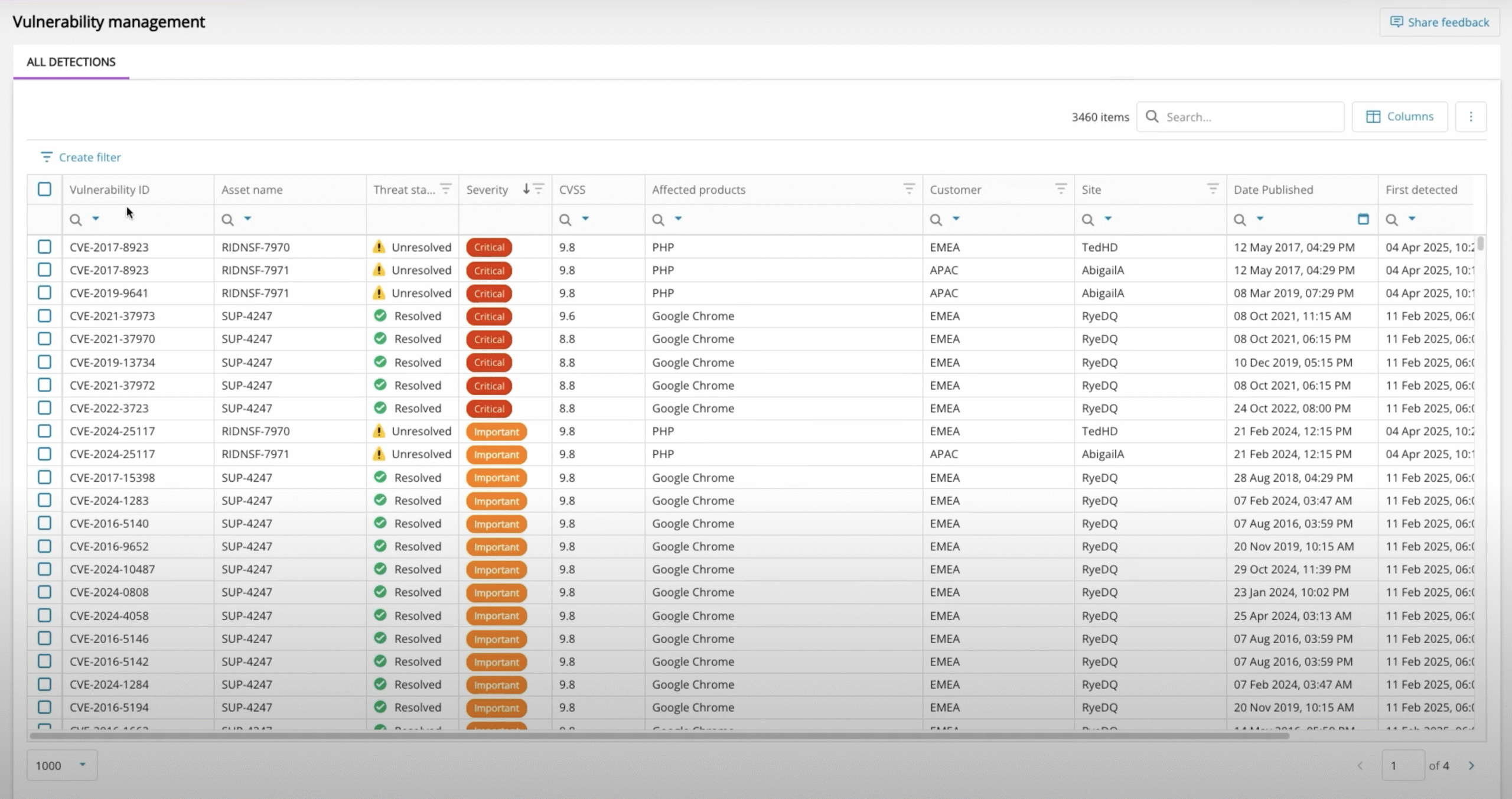
New Vulnerability Management dashboard
Vulnerability Management to MSPs identify, prioritize and remediate software vulnerabilities
Implement API for Modern ITSM Integration
Modernizing our ITSM APIs to have a modern authentication method.
Update Stock Monitoring to support Veeam 13
Updated the following built-in Veeam monitoring services to support Veeam Backup & Replication 13
Update Automation Manager to support PowerShell 7 onwards
Going forward we will now support Powershell 7.0+ in Automation Manager.
Native Dark Mode for N‑central UI
N‑central now offers a built-in Dark Mode that makes it easier to manage your environment comfortably throughout the day. Whether you’re monitoring critical systems from a NOC, responding to alerts after hours, or spending extended time in the console, Dark Mode delivers a modern viewing experience designed to reduce visual fatigue while maintaining clarity and readability. Combined with future personalization and accessibility enhancements, N‑central gives every technician a workspace that adapts to how they work best.
Improve API Experience
Our goal is to make the central REST APIs easier for our partners to use, streamlining their workflows and addressing the initial limitations they have experienced. By focusing on greater efficiency and a more seamless experience, we are committed to supporting our partners’ success and reducing any frustrations they may have encountered.
N-zo AI Enhancements
Ongoing updates to N-zo AI in terms of capabilities, skills, data and insights.
Introducing N-zo AI – Your AI-powered security and operations assistant that truly understands the needs of your business. Precise, context-driven insights from AI to reduce risk, strengthen resilience and speed up troubleshooting with proactive, data-driven assessments and IT expert recommendations.
Asset Hardware and Config Change Events in Device Activities
Display this update as an Activity in the Activities view
UX Delighters - Continued Assets View Enhancements & Improvements
Quick click assets view refresh providing an up to date picture of the managed estate, slicker navigation of assets within asset details, quickly and easily copy key datapoints through a single click for use in other systems.
Fine tuning of existing datapoints ensuring a clear and concise picture of an asset by reducing screen clutter.
UEM MCP Server Enhancements
Ongoing updates to the MCP server in terms of capabilities, skills, data and insights.
Introducing the N‑able UEM MCP Server – Built on GraphQL, it is now possible to directly connect your UEM operations, management and data into your own applications environment with our AI-powered MCP Server. Read about it here N‑able MCP – Connect AI Tools to Your N‑able Platform
Script Scheduling
This initiative introduces script scheduling to help technicians automate maintenance and remediation tasks across multiple devices. By supporting one‑time and recurring schedules, technicians can ensure critical jobs run consistently without manual effort. A new Scheduled Scripts view provides clear visibility into upcoming, active, and completed schedules, improving efficiency and control across environments.
Device Management API Updates
We’ve made it easier to manage devices and get the information you need through the N‑central API:
- New! Add Devices Automatically
You can now use POST /api/device endpoint to create devices through the API – ideal for scaling environments, automating deployments, and saving time.
- Improved! See Application Names More Clearly
The GET /api/device/{deviceid}/asset call now includes the application name (application.displayName), so it’s easier to identify the installed applications on each device.
Modern Multi OS Patch 2.0 - Windows Patching
We’re developing a new unified UI for N‑sight and N‑central, designed to streamline patch management across Windows, Mac, and Linux devices. This update focuses on enhancing the experience for Windows environments, providing a consistent, intuitive interface for managing multi-OS environments with ease.
Azure Resource Manager
View and manage Azure resources directly in N‑central with a multi-tenant single-pane-of-glass overview
Cloud Asset Manager for Azure Resources
View and manage Azure resources directly in N‑central with a multi-tenant single-pane-of-glass overview
Reset N‑able Login within N‑central
Allow the ability to reset N‑able Login from within N‑central.
ARM Support
Will be adding ARM support to device monitoring and management in N‑central.
Asset Discovery through MS Intune
We will be improving the discovery of devices through Intune to modernize it.
Agent Release Decoupling
We will be decoupling the Agent from the complete backend of N‑central. This will allow for the release of the agent without needing to release and upgrade of N‑central as whole.
Authorization to uninstall Agent
We will prompt for authorization when uninstalling an Agent.
Alternative to launching application for Remote Access by Java
Allowing for the for an alternative to Java for launching the application for Remote Access.
Add OS Installation Date as a default Information to each device
We are adding the OS Installation Date to the default information in each device in the All devices View.
Make the Direct Support Command Prompt Scrollable
Enhance the Direct Support command prompt by making it scrollable
Service Template and Rule Application Optimization
We’ve introduced a major modernization and performance optimization for Filter Preview and Rule Show Devices functionality. This enhancement replaces the legacy preview execution model with a faster, scalable, in-memory evaluation framework while introducing a modernized shared preview grid experience across Filters and Rules.
AI-Powered Asset Summary View
A new N-zo AI powered Asser Summary View to deliver instant insights and recommendations for the selected asset. A comprehensive, up to date summary produced by N-zo that gives IT professionals instant visibility into critical details related to hardware and system specifications, component health, security posture, and current operational status. It reduces the need to jump around to different sections in the UI or manually gather data from multiple sources, thereby accelerating troubleshooting, enhancing decision-making, and ensuring proactive management of system health and security.
Improve REWST integration
Streamline the integration between N‑central and REWST
Warranty LookUp Clean-up
We are consistently enhancing our warranty lookup process to provide accurate and reliable warranty details.
Support for Linux Red Hat 10
As part of our ongoing commitment to improving the experience of our partners, we will soon offer full support for Red Hat Linux 10.
Product Bar Seamless Navigation
Introduce the N‑able Product Bar to N‑central in order to enable seamless navigation to other N‑able products leveraging SSO.