Scaling Managed Services Without Scaling Risk – How JKC Built a Proactive, Secure MSP with N‑able
- Employees: 2-10
- Founded: 2008
- Customer since: 2016
- N-able solutions: Adlumin MDR, EDR, N-sight, Cove
Explore practical guides, videos, and webinars to help you get started and make the most of N‑sight. From quick tips to efficient workflows, these resources are here to make IT management simpler and more effective.
Discover how IT teams like yours simplify management and deliver results with N‑sight.
A new ability to add custom tags / labels to assets, to let partners create custom groupings of devices to be used for asset management and in automation and policy deployment workflows.
Dynamic tagging allows for the creation of rules to automatically apply and remove tags from qualifying assets.
We’re developing a new unified UI for N‑sight and N‑central, designed to streamline patch management across Windows, Mac, and Linux devices. This update focuses on enhancing the experience for Linux environments, providing a consistent, intuitive interface for managing multi-OS environments with ease.
View recent asset activity related to logins, logouts, lockouts, system crashes and unexpected shutdowns. This is just the start, more to follow!
Access UEM data and functions programmatically with a brand-new Ecoverse API, available from the N‑able Developer portal with new access controls and token management.
Easily determine the encryption status of a machine directly within the Assets View data grid with deeper visibility into individual drive status via Asset Details.
A new ability to add custom tags / labels to assets, to let partners create custom groupings of devices to be used for asset management and in automation and policy deployment workflows.
Static tagging allows for the manual creation and assignment of tags to assets.
We’re delighted to announce that N‑sight’s partner API is now available in the new N‑able Developer Portal. This portal combines advanced features like Swagger, sandbox environments, and AI tools to streamline API integration and development. Whether you’re a beginner or an experienced developer, this portal enhances efficiency and innovation.
Introduce Entra ID (Azure AD) as an authentication source for N‑sight partners. It means you are able to provision (onboard, offboard, edit) users Microsoft Entra directly into N‑sight.
Adding Patch feature install status to the North Pane, updating the icon used with System Tray so it shows up better for Windows 11 Devices. Improving UX when selecting devices when using the Edit Checks Like This option.
Remote Background in Assets View replacing the current deep link model used to connect to N‑central or N‑sight. The work spans agent deployment, session management, technician tooling, and configuration.
We are enhancing the new Activities view with system shutdown events. Additionally we’re adding a slide-out panel so it is easier to view activity details, and will also make the details column searchable.
This initiative introduces script scheduling to help technicians automate maintenance and remediation tasks across multiple devices. By supporting one‑time and recurring schedules, technicians can ensure critical jobs run consistently without manual effort. A new Scheduled Scripts view provides clear visibility into upcoming, active, and completed schedules, improving efficiency and control across environments.
This initiative introduces native Take Control support for Linux devices within the ecoverse platform (Asset View).
Easily spot devices that require a reboot following updates or patch installs and take action to ensure endpoints have the latest updates applied.
This introduces bulk script execution across multiple devices; technicians can run scripts at scale via the Assets view and track results in real time through new Completed Script Executions and Pending Tasks views. This improves efficiency, ensures consistent outcomes across endpoints, and provides clear visibility into actions taken across the environment.
Making advanced reboot controls more easily accessible from the North Pane with a new custom reboot option. Deeplinking from the North Pane through to the Assets view custom reboot options means technicians can configure snooze, cancel, and custom messages.
Quick click assets view refresh providing an up to date picture of the managed estate, slicker navigation of assets within asset details, quickly and easily copy key datapoints through a single click for use in other systems.
Fine tuning of existing datapoints ensuring a clear and concise picture of an asset by reducing screen clutter.
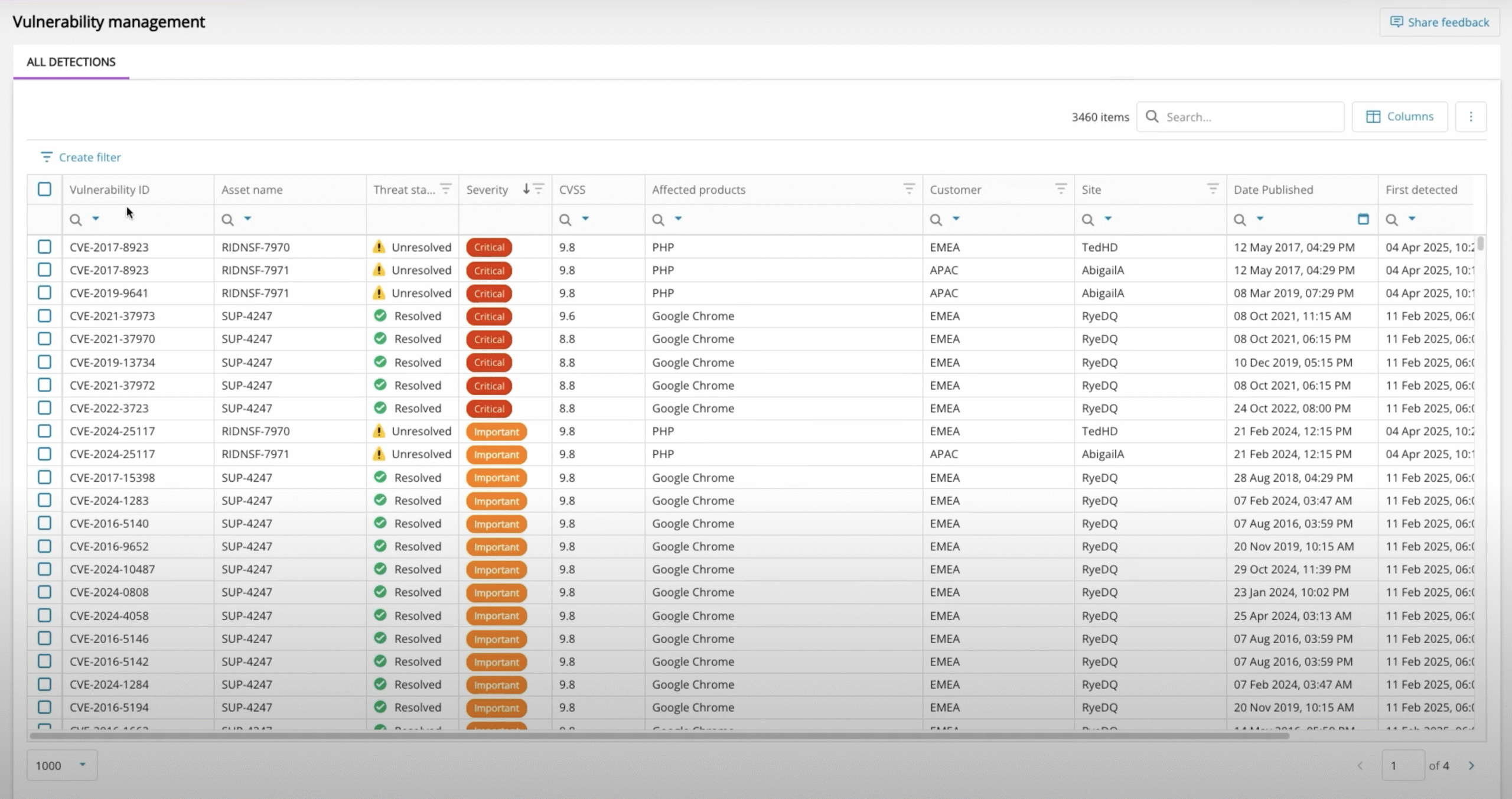
View a comprehensive list of CVE details, including descriptions, severity ratings, and links to CVE database entries.
Export filtered lists of CVEs to Excel for analysis, reporting and management.
A new audit log to capture user activities for compliance and investigation as we modernize N‑sight’s capabilities.
Add and edit custom scripts in a brand new script repository, with an easy workflow to run scripts on demand to resolve or prevent issues.
We’re developing a new unified UI for N‑sight and N‑central, designed to streamline patch management across Windows, Mac, and Linux devices. This update focuses on enhancing the experience for Windows environments, providing a consistent, intuitive interface for managing multi-OS environments with ease.
Select which endpoint credentials to run scripts with, e.g. system user vs local admin, so techs can run any script as required.
We’re developing a new unified UI for N‑sight and N‑central, designed to streamline patch management across Windows, Mac, and Linux devices. This update focuses on enhancing the experience for Apple (Mac) environments, providing a consistent, intuitive interface for managing multi-OS environments with ease.
Comprehensive list of software installed on a per asset basis directly within the asset details slide out panel
We will delivery items from research and feedback discovered during the MVP stage that are required for GA release to support the Patch Team.
The goal of this initiative is as follows:
Display this update as an Activity in the Activities view
The Goal of this initiative is enable Admin to stack more than 1 policy per asset for a certain policy types.
The new Summary Tab delivers a comprehensive, up to date summary of endpoints, giving IT professionals instant visibility into critical details. It consolidates hardware and system specifications, component health, security posture, and current operational status into a single, easy-to-read overview. It reduces the need to jump around to different sections in the UI or manually gather data from multiple sources, thereby accelerating troubleshooting, enhancing decision-making, and ensuring proactive management of system health and security.
This initiative allows partners to save scripts at the partner level, making them centrally accessible across all managed devices without duplication or reconfiguration. By storing the partner level scripts in the script repository, a centralised location, technicians can standardise common tasks, streamline workflows, and reduce repetitive setup.
Agent Logging & Telemetry
More out of the box security and performance monitoring with BitLocker Keys, Battery Health, Take Control and Patch Health checks, Install and Uninstall Application Checks
Dashboard interface for creating custom configuration profiles
Introduce the capability to connect N‑sight to PowerBI for custom reporting and analytics, offering operational metrics and insights as well as customer-facing reports and dashboards.
Introduce an MSI agent installer, including support for deploying the N‑sight agent via Intune