N‑sight Resources
Explore practical guides, videos, and webinars to help you get started and make the most of N‑sight. From quick tips to efficient workflows, these resources are here to make IT management simpler and more effective.
Nothing to display
Customer Stories
Discover how IT teams like yours simplify management and deliver results with N‑sight.
Product roadmap
Static Asset Tags for Categorisation and Management
A new ability to add custom tags / labels to assets, to let partners create custom groupings of devices to be used for asset management and in automation and policy deployment workflows.
Static tagging allows for the manual creation and assignment of tags to assets.
CPU and Memory Usage Metrics
View recent CPU and Memory Usage trends to help detect, diagnose and resolve IT issues more efficiently.
July Delighters - Small but Impactful Feature Updates
Report Improvements to the Feature Policy Report and Automated Task Report, Standard Remote Background Manager for accounts that up to now only have the Take Control Viewer version, and Windows Agent Upgrade Improvements.
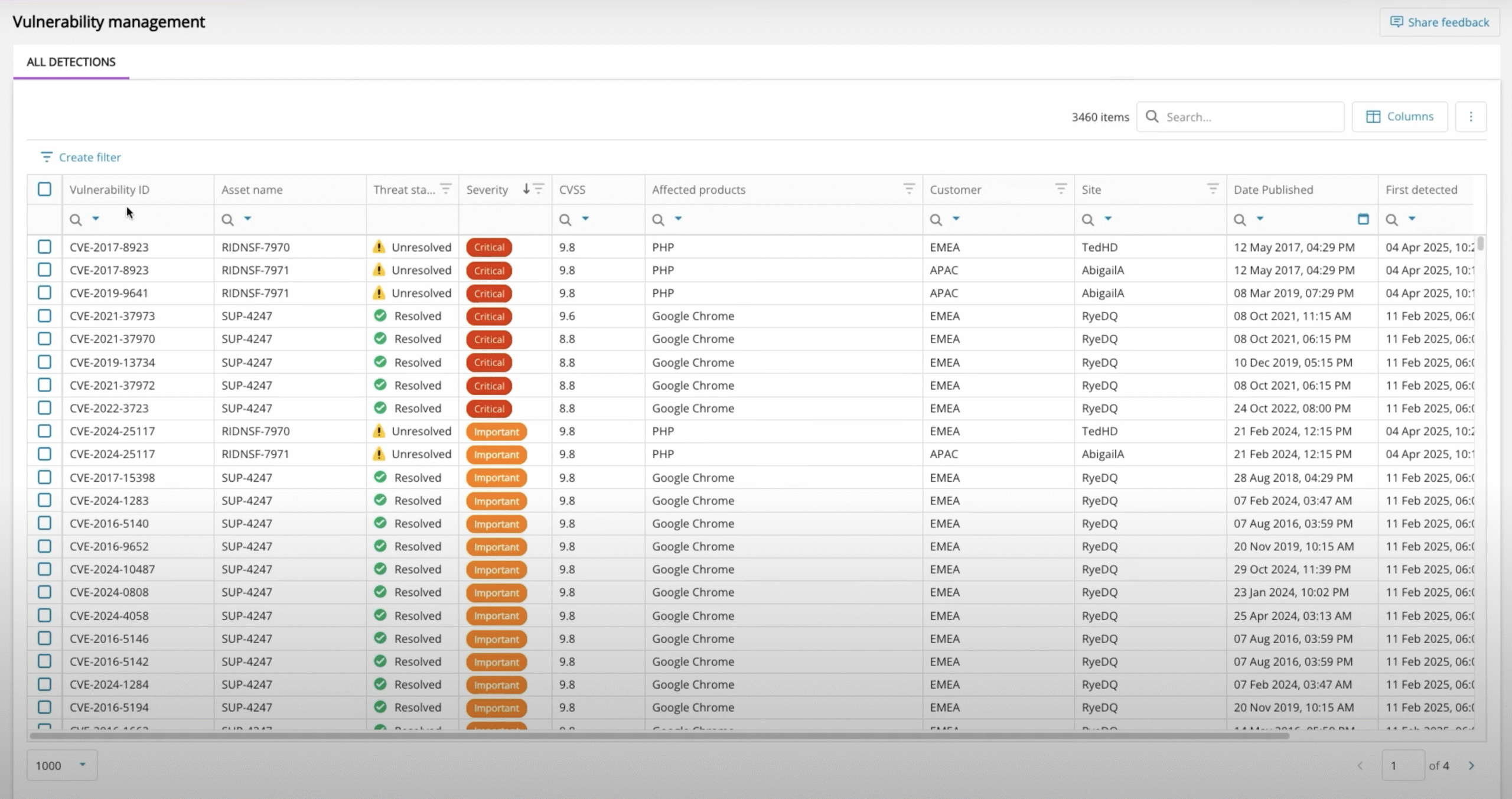
Vulnerability Management - Patch Availability
Quickly see which vulnerabilities can be addressed by software patches.
A New Asset Details View for Quick Oversight
A new device level overview section, with easy navigation between assets, available from the new Assets View
Introducing the Developer Portal for N‑sight
We’re delighted to announce that N‑sight’s partner API is now available in the new N‑able Developer Portal. This portal combines advanced features like Swagger, sandbox environments, and AI tools to streamline API integration and development. Whether you’re a beginner or an experienced developer, this portal enhances efficiency and innovation.
Modern Multi OS Patch UI - Linux Patching
We’re developing a new unified UI for N‑sight and N‑central, designed to streamline patch management across Windows, Mac, and Linux devices. This update focuses on enhancing the experience for Linux environments, providing a consistent, intuitive interface for managing multi-OS environments with ease.
UX Delighters - Small but Impactful Feature Updates
Adding Patch feature install status to the North Pane, updating the icon used with System Tray so it shows up better for Windows 11 Devices. Improving UX when selecting devices when using the Edit Checks Like This option.
Dynamic Asset Tags for Categorisation and Management
A new ability to add custom tags / labels to assets, to let partners create custom groupings of devices to be used for asset management and in automation and policy deployment workflows.
Dynamic tagging allows for the creation of rules to automatically apply and remove tags from qualifying assets.
A New Reboot with More End-User Options e.g. Snooze
Provide customers a better service with end-user friendly reboot options such as snooze or cancel. Show your own logo for additional brand recognition as part of your service.
Asset Activities for Rapid Issue Insights
View recent asset activity related to logins, logouts, lockouts, system crashes and unexpected shutdowns. This is just the start, more to follow!
Developer Portal - New Ecoverse API
Access UEM data and functions programmatically with a brand-new Ecoverse API, available from the N‑able Developer portal with new access controls and token management.
Vulnerability Management - CVE Details View
View a comprehensive list of CVE details, including descriptions, severity ratings, and links to CVE database entries.
Upgrades to Unmonitored Devices View
UI and data accuracy improvements to the Unmonitored Devices view to make it easier to detect unmanaged devices connecting to customers’ networks.
Vulnerability Management - Bulk Export of CVEs
Export filtered lists of CVEs to Excel for analysis, reporting and management.
A New, Encompassing Audit Report
A new audit log to capture user activities for compliance and investigation as we modernize N‑sight’s capabilities.
New Custom Scripts Engine with Easy Run on Demand
Add and edit custom scripts in a brand new script repository, with an easy workflow to run scripts on demand to resolve or prevent issues.
Modern Multi OS Patch UI - Windows Patching
We’re developing a new unified UI for N‑sight and N‑central, designed to streamline patch management across Windows, Mac, and Linux devices. This update focuses on enhancing the experience for Windows environments, providing a consistent, intuitive interface for managing multi-OS environments with ease.
Entra ID Support for N‑sight SSO
Introduce Entra ID (Azure AD) as an authentication source for N‑sight partners. It means you are able to provision (onboard, offboard, edit) users Microsoft Entra directly into N‑sight.
Run Scripts with Different Endpoint Credentials
Select which endpoint credentials to run scripts with, e.g. system user vs local admin, so techs can run any script as required.
Modern Multi OS Patch UI - Apple Patching
We’re developing a new unified UI for N‑sight and N‑central, designed to streamline patch management across Windows, Mac, and Linux devices. This update focuses on enhancing the experience for Apple (Mac) environments, providing a consistent, intuitive interface for managing multi-OS environments with ease.
New Monitoring Scripts for Security & Performance
More out of the box security and performance monitoring with BitLocker Keys, Battery Health, Take Control and Patch Health checks, Install and Uninstall Application Checks
Azure Resource Manager
View and manage Azure resources directly in N‑sight with a multi-tenant single-pane-of-glass overview
A New Reboot with Recurring Schedules
Create detailed, recurring schedules for reboots for proactive management. View and filter assets to see exactly which schedules they have for oversight and management.
Software Inventory
View software and versions installed across our estate, with links to see the devices that have a specific piece of software. Install and uninstall software and export the inventory data for reports and management.
HaloPSA Integration in N‑sight
Introduce an integration with HaloPSA so that you can automatically sync assets, clients, and track support tickets and alerts between the two platforms.
Device Management for Apple: Configuration Profile maker/editor
Dashboard interface for creating custom configuration profiles
Integration with PowerBI for N‑sight reports and analytics
Introduce the capability to connect N‑sight to PowerBI for custom reporting and analytics, offering operational metrics and insights as well as customer-facing reports and dashboards.
New MSI agent installer
Introduce an MSI agent installer, including support for deploying the N‑sight agent via Intune